
You log into Google Search Console one morning and see it: a yellow warning that your pages are failing Core Web Vitals. No context, no plain-English explanation, just three acronyms and a chart that looks like a heart monitor.
If you’re a small business owner, this is usually the moment Core Web Vitals enter your life. And almost everything written about them is aimed at developers, not the person actually running the business.
This guide fixes that. Core web vitals explained the way they should be: in plain English, with honest context about how much they actually affect your SEO, and a clear answer to the only question that matters. What do you need to do about it?
What Core Web Vitals are
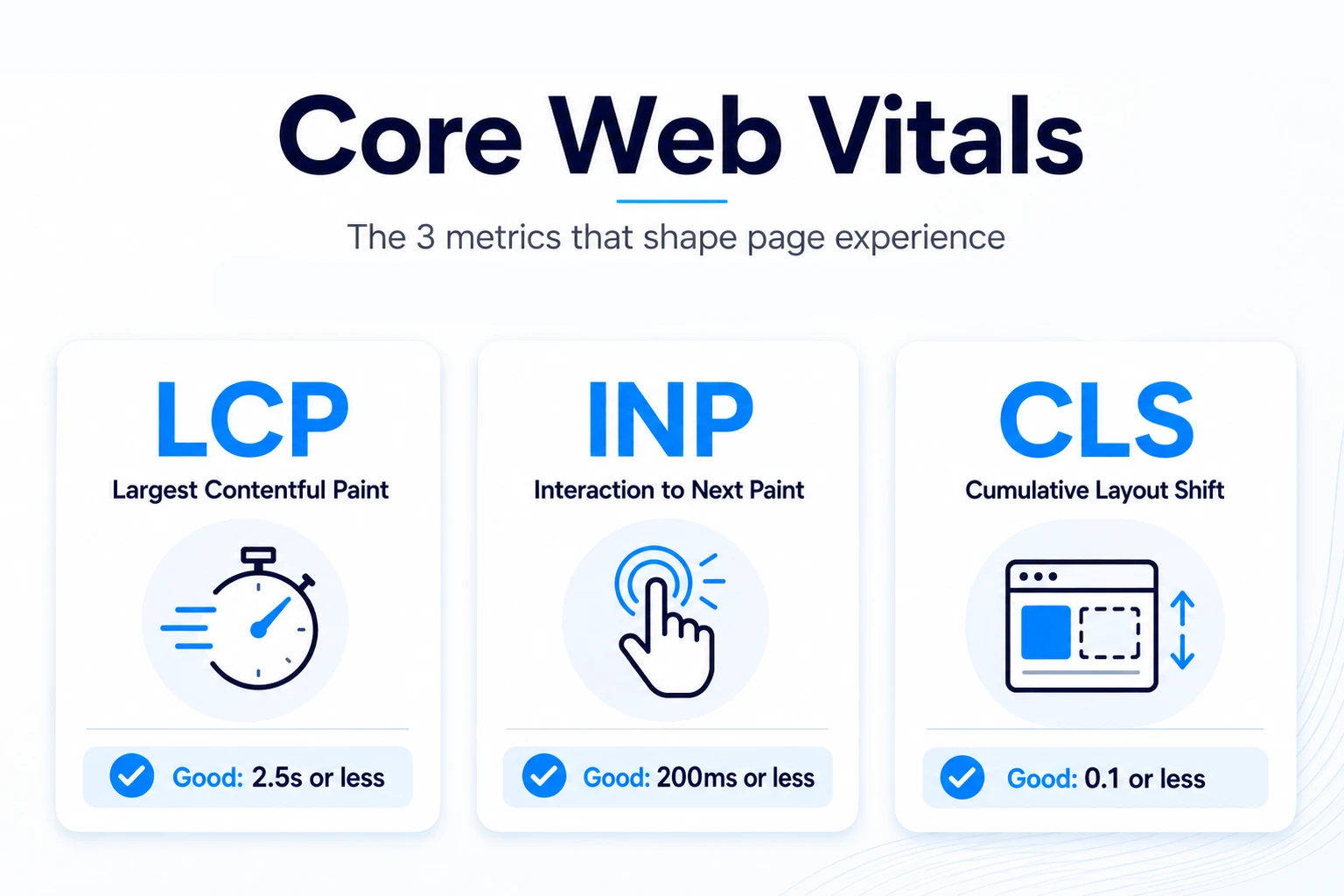
Core Web Vitals are three metrics Google uses to measure how real people experience your website. They track how fast your main content loads, how quickly your page responds when someone clicks or taps, and how much the layout jumps around while loading. Google uses these scores as part of its page experience signals, which feed into search rankings.
The three metrics are:
- Largest Contentful Paint (LCP): measures loading speed. Good score: 2.5 seconds or faster.
- Interaction to Next Paint (INP): measures responsiveness. Good score: 200 milliseconds or less.
- Cumulative Layout Shift (CLS): measures visual stability. Good score: less than 0.1.
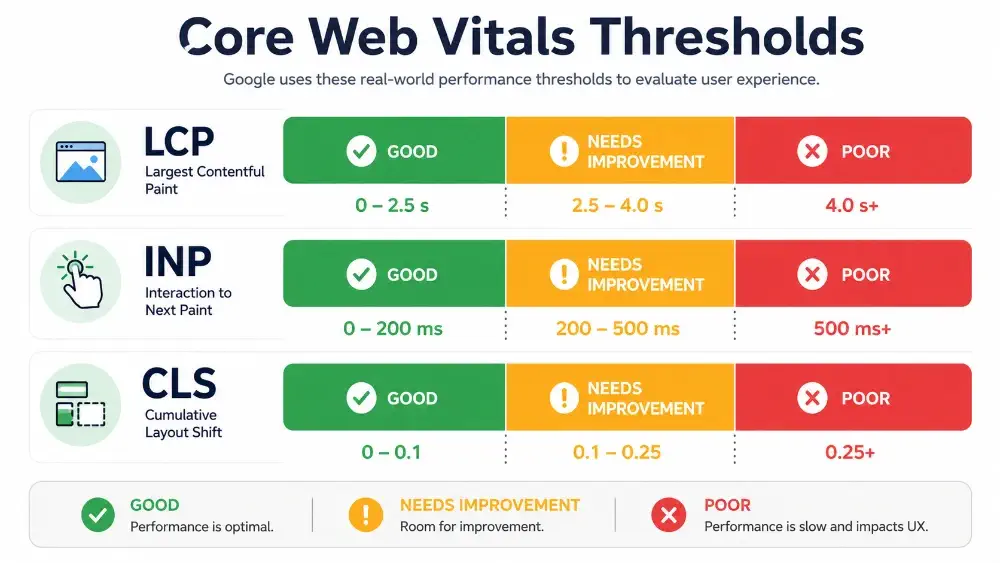
Google grades your site at the 75th percentile of real user visits. That means at least 75% of your visitors need to hit those thresholds for your page to be considered “good.”
The three metrics, broken down
Largest Contentful Paint (LCP): how fast your main content loads
LCP measures the time it takes for the biggest visible element on your page to load. Good LCP is 2.5 seconds or faster. On most small business pages, the “largest element” is the hero image, a banner, or the main headline at the top of the page.
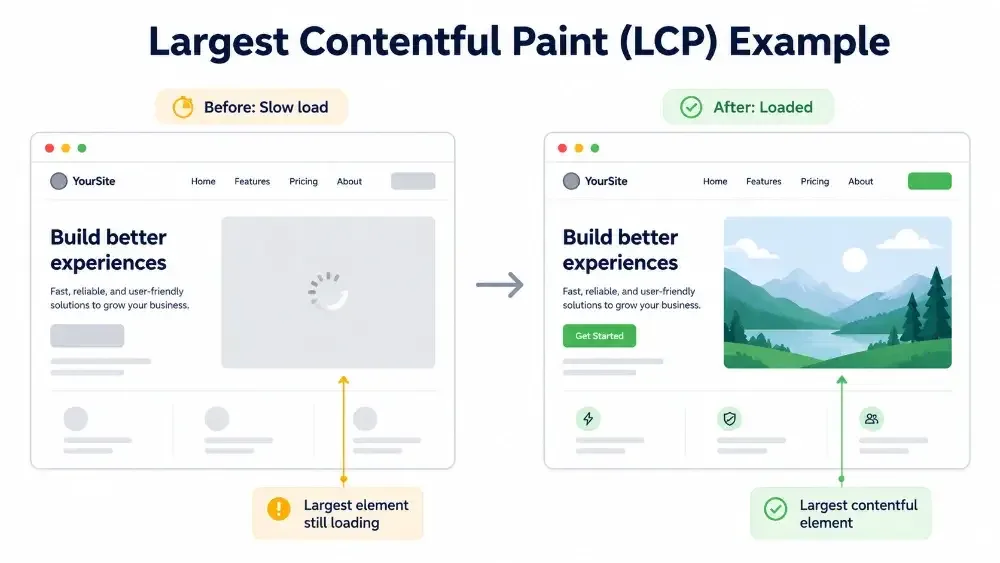
This is the metric most people intuitively understand. If your homepage takes five seconds to show its main image, visitors are already deciding whether to leave. So is Google.
Common culprits for slow LCP on small business sites: oversized hero images that weren’t compressed, slow hosting, render-blocking scripts, and bloated themes loaded with features nobody uses.
Interaction to Next Paint (INP): how snappy your page feels
INP measures how quickly your page responds to clicks, taps, and key presses across the entire visit. Good INP is 200 milliseconds or less. It replaced the older First Input Delay (FID) metric in March 2024, which is why some older guides still reference FID.
The plain-English version: when a user taps “Book Now” or opens your menu, does the page respond instantly, or does it freeze for a beat before reacting? That freeze, no matter how brief, is what INP measures.
The usual cause is heavy JavaScript. Booking widgets, chat plugins, tracking scripts, and page builders that load too much code on every page all add up.
Cumulative Layout Shift (CLS): how stable your layout is
CLS measures how much your page jumps around while it loads. Good CLS is below 0.1. Think about reading a paragraph on your phone, then an ad or image suddenly loads above it and pushes everything down. That’s a layout shift.
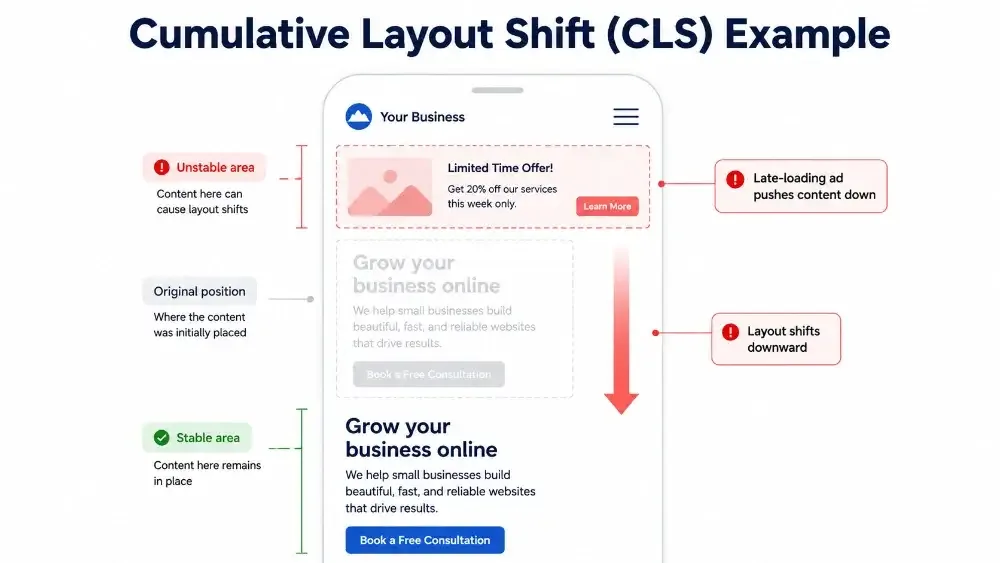
It feels minor when it happens once. It feels broken when it happens every time someone visits. CLS is especially punishing on mobile, where small shifts cause misclicks (you tap “Book a table” and accidentally hit “Cancel” because the page shifted at the exact wrong moment).
Common causes: images and videos without width and height attributes, ads injecting late, web fonts loading after the page renders, and pop-ups that push content down.
How Google uses Core Web Vitals for rankings
Here’s the honest version most articles won’t give you.
Core Web Vitals are a ranking signal, but they are not a top-three ranking factor. Google’s own John Mueller has been clear that content relevance still matters far more than page speed. Faster than a competitor isn’t enough to leapfrog them in the results if their content better answers the searcher’s intent.
Where Core Web Vitals actually move the needle is in competitive niches where multiple pages have similar content quality. In that scenario, page experience becomes the tiebreaker. For most small businesses, especially local service businesses competing against five or ten other companies in the same city, that tiebreaker matters.
There’s a second reason this matters now that didn’t exist a few years ago: Core Web Vitals influence how AI search and AI Overviews evaluate page quality. Slow, broken-feeling pages are less likely to be cited by AI search results, which means the cost of ignoring them is climbing.
The takeaway: don’t treat Core Web Vitals as the silver bullet that will save weak content. Treat them as the floor your site needs to clear so your good content can rank.
Why Core Web Vitals matter more for small businesses than people think
The Core Web Vitals conversation usually gets framed around enterprise sites and e-commerce giants. That framing hides why this matters for small businesses.
Three reasons it matters more for you, not less:
Mobile traffic is the majority of your traffic. Small business sites, especially local service businesses, see a heavy share of mobile visits, often from people on the move with weaker connections. Mobile is where Core Web Vitals problems hit hardest and where good scores deliver the biggest experience lift.
You’re competing against larger sites with bigger budgets. When you’re up against a national chain or a well-funded competitor for the same local search, you don’t have a brand-recognition advantage. A fast, snappy site is one of the few places you can actually out-execute them.
A slow site silently kills conversions. Every second of load time on a service page or product page costs you bookings, calls, and sales. The damage is invisible because the people you lost never filled out the form. Core Web Vitals are the closest thing you have to an early warning system.
For small businesses on local search, the connection is even more direct. If your “near me” landing pages load slowly or shift around on mobile, you’re losing the prospect before they even read what you offer. Our on-page SEO checklist for small businesses covers the on-page side of this conversation in detail.
How to check your Core Web Vitals scores
You don’t need a developer to find out where you stand. Three free tools cover almost everything most small business owners need:
Google Search Console. Inside Search Console, go to Experience > Core Web Vitals. This shows you the real-user data Google is actually grading your site on, broken out by mobile and desktop, and grouped by which pages are passing or failing. Start here.
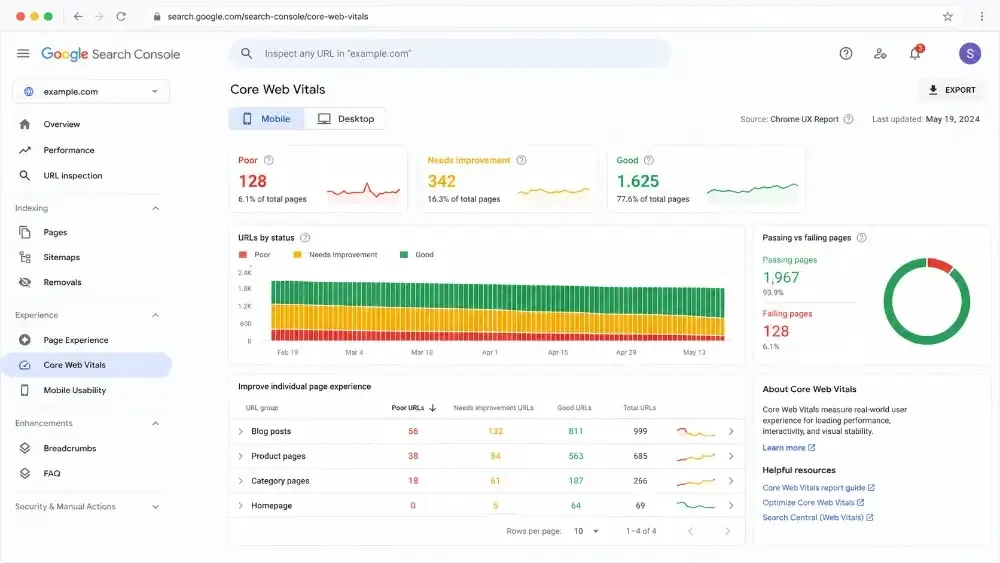
PageSpeed Insights. Paste any URL into pagespeed.web.dev and it will run a full Core Web Vitals analysis on that specific page. You’ll see both real-user data (from the Chrome User Experience Report) and lab data (from a simulated test). It also gives you a prioritized list of fixes.
Lighthouse. Built into Chrome’s DevTools. Useful if you want to run repeated tests as you make changes. The numbers it shows are lab data, not real-user data, so use it for testing fixes, not for deciding whether your site is actually passing.
A practical workflow: check Search Console to see which page groups are failing, then run individual problem pages through PageSpeed Insights to see specific fixes.
If you want a fuller picture of your site’s technical health beyond just CWV, our technical SEO audit checklist walks through what else to look for.
Common reasons small business sites fail (and what to do about each)
Most small business sites fail Core Web Vitals for the same handful of reasons. Here are the usual suspects and the practical fix for each.
Oversized images. Hero images and product photos uploaded at full camera resolution are the single most common LCP killer. Compress images before uploading. Use modern formats like WebP. Set width and height attributes so the browser reserves space for them.
Slow or shared hosting. Cheap shared hosting can add a second or more to every page load just on server response time. If your site is on bargain hosting and your LCP is bad, that’s where to look first.
Bloated themes and page builders. Many WordPress themes load every feature on every page, even the ones the page doesn’t use. Switching to a faster theme, or auditing which plugins are actually needed, often produces dramatic LCP and INP improvements.
Too many third-party scripts. Chat widgets, booking tools, tracking pixels, popup tools, and review widgets all add JavaScript. Each one is fine on its own. Stacked together, they wreck INP. Audit what’s loading on your site and remove what you’re not actively using.
Pop-ups and late-loading ads. These are the leading cause of bad CLS. If a pop-up appears two seconds in and shoves your content down, that shift counts against you. Reserve space for any element that will load late, or load it in a way that doesn’t push other content.
Web fonts loading after the page renders. Custom fonts that load after the initial paint cause a flash of unstyled text and contribute to layout shift. Preloading critical fonts and using font-display settings correctly solves this.
What to fix yourself vs. what to hand off
Some of this you can absolutely handle yourself. Some of it needs a developer or specialist. Here’s the honest split.
You can probably DIY:
- Compressing images and uploading them at sensible sizes
- Removing plugins, widgets, and tracking scripts you no longer use
- Auditing pop-ups and giving them reserved space or delayed triggers
- Checking your hosting plan and upgrading if you’re on bargain shared hosting
You probably want help with:
- Theme migrations or switching page builders
- JavaScript optimization, code splitting, and deferring scripts
- Server-side performance tuning, caching configuration, and CDN setup
- Diagnosing INP issues caused by interaction handlers buried in theme code
A useful rule of thumb: if the fix involves editing files, configuring servers, or writing code, hand it off. If the fix involves swapping an image, removing a plugin, or adjusting a setting in your CMS, do it yourself.
If you’re not sure which category your problems fall into, a technical SEO audit will tell you what’s actually broken, what’s costing you traffic, and exactly what needs a specialist versus what you can knock out yourself.
The takeaway
Core Web Vitals are not the most important thing about your SEO. They are the floor your site needs to clear so your content can do its job.
For a small business, that floor is more strategically important than the discourse suggests. You’re competing for mobile users, often against larger competitors, in moments where page experience genuinely tips the decision. Failing Core Web Vitals isn’t just a technical warning. It’s a quiet leak in your funnel.
Start with Search Console. Find out which pages are failing. Fix what you can yourself. Get help with what you can’t. The work compounds, and the longer you wait, the more the gap costs you.
