
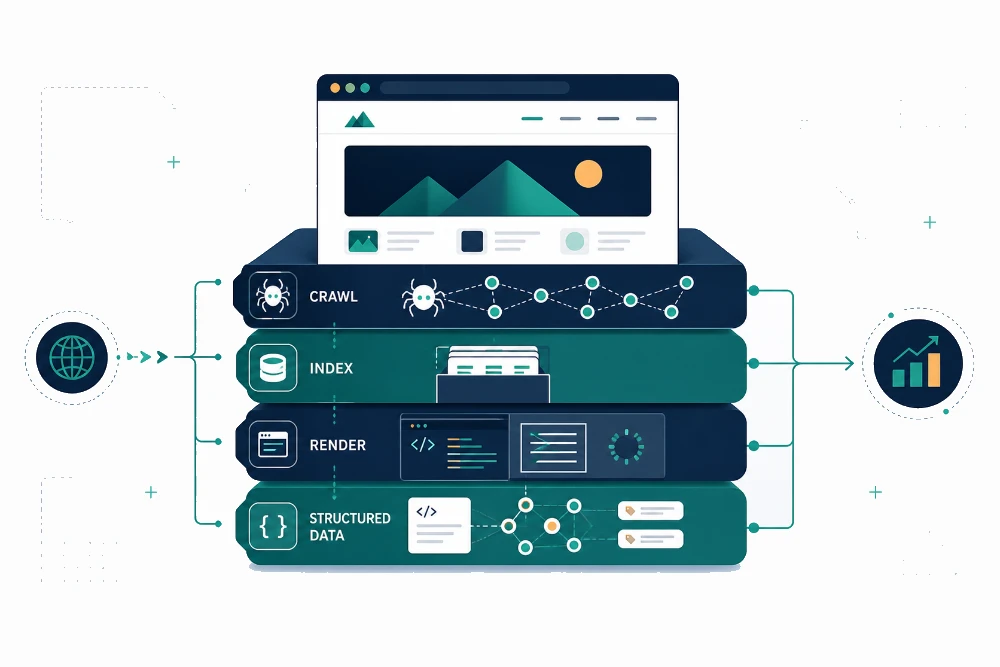
Most websites lose rankings not because of weak content, but because something underneath the hood is broken. A page that takes seven seconds to load, a robots.txt file blocking a key directory, a canonical tag pointing to the wrong URL. These are the kinds of issues that quietly kill visibility. A good technical SEO audit checklist helps you catch them before they cost you traffic.
This guide walks through what to actually look for during a technical SEO audit in 2026. It covers the items that matter for rankings, the ones that matter for AI search visibility, and the ones you can safely deprioritize. No 200-item dump. Just what’s worth your attention.
What is a technical SEO audit?
A technical SEO audit is a structured review of the technical elements that affect how search engines and AI systems crawl, render, index, and understand your website. It focuses on the infrastructure beneath your content, not the content itself.
A complete audit typically covers:
- Crawlability and indexation
- Site architecture and internal linking
- Page speed and Core Web Vitals
- Mobile usability
- Structured data and schema markup
- Security and HTTPS hygiene
- AI search readiness
The goal is to surface anything that prevents search engines from finding, understanding, or trusting your pages. Even great content can’t rank if the technical foundation is broken.
When to run a technical SEO audit
Most sites benefit from a full audit at least quarterly. There are also specific moments where running one is non-negotiable:
- After a website redesign or platform migration
- When organic traffic drops without a clear content reason
- Before launching a new product, service area, or location page
- After a major Google algorithm update
- When indexing or ranking issues appear in Google Search Console
- Before investing in a new SEO or content campaign
If you’ve never run one, the first audit is almost always the most valuable. It usually surfaces issues that have been quietly compounding for months or years.
The technical SEO audit checklist
Here are the seven categories every technical SEO audit should cover, with the specific items to check inside each.
1. Crawlability and indexation
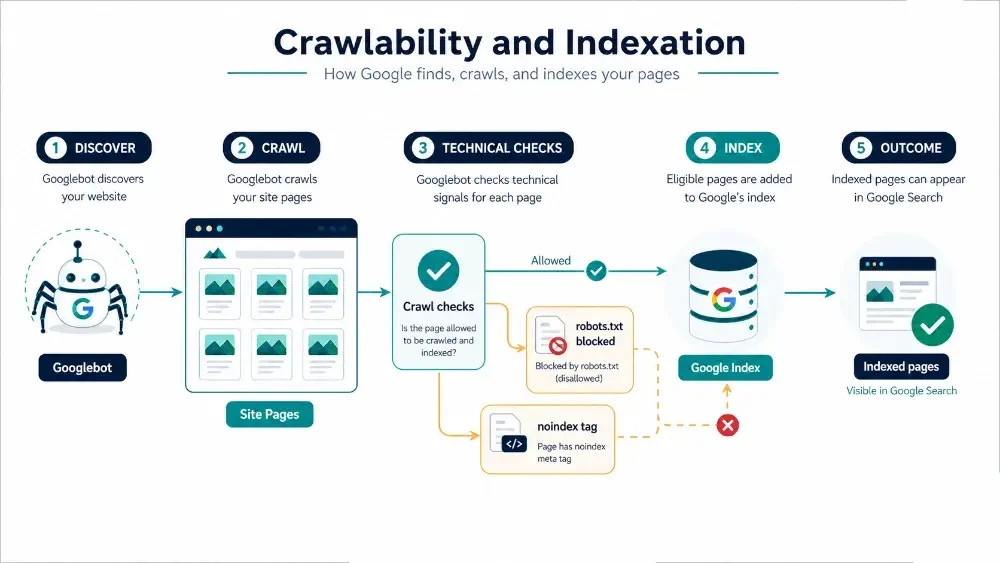
This is where most ranking issues start. If Google can’t crawl or index a page properly, nothing else matters.
- Robots.txt: Make sure it isn’t blocking important directories, CSS, or JavaScript files
- XML sitemap: Confirm it’s submitted to Google Search Console, includes only indexable URLs, and stays free of 404s and redirects
- Index coverage: Review the Pages report in Search Console for excluded, error, or noindex pages that shouldn’t be flagged
- Canonical tags: Check that each page points to the correct canonical URL. Duplicate or conflicting canonicals are a common silent killer
- Noindex tags: Audit for accidental noindex directives on important pages
- Orphan pages: Identify pages with zero internal links pointing to them. They’re invisible to crawlers that rely on link discovery
2. Site architecture and internal linking
Site structure tells search engines which pages matter most and how they relate to each other.
- Crawl depth: Important pages should be reachable within three clicks from the homepage
- Internal linking distribution: Pages you want to rank should have proportionally more internal links pointing to them
- Anchor text: Use descriptive, varied anchor text. Avoid “click here” or repetitive exact-match links
- Breadcrumbs: Implement breadcrumb navigation with structured data markup
- Redirect chains: Eliminate chains longer than two hops. Each hop loses link equity
- Broken internal links: Crawl your site and fix any 404s or broken redirects
A focused on-page SEO strategy works best when the underlying architecture supports it.
3. Page speed and Core Web Vitals
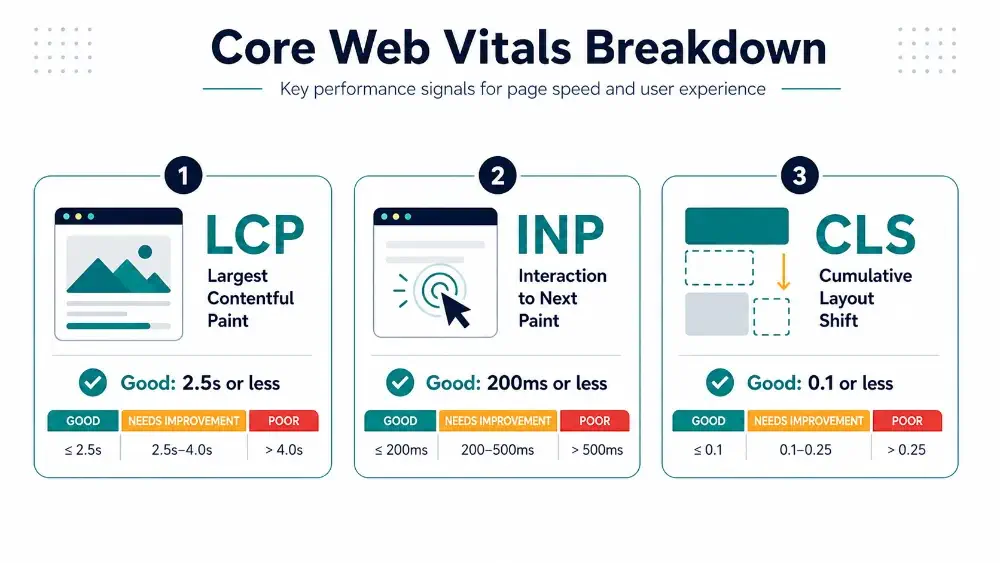
Speed isn’t just a ranking factor. It’s a conversion factor. Google’s Core Web Vitals quantify the parts of the user experience that matter most.
- Largest Contentful Paint (LCP): Aim for under 2.5 seconds. Optimize images, lazy-load below-the-fold media, and reduce server response time
- Interaction to Next Paint (INP): Aim for under 200 milliseconds. INP replaced FID in 2024 and measures responsiveness more accurately
- Cumulative Layout Shift (CLS): Aim for under 0.1. Reserve space for images, ads, and embeds to prevent shifting
- Image optimization: Compress, use modern formats (WebP, AVIF), and serve appropriately sized images
- Render-blocking resources: Defer or async-load non-critical JavaScript and CSS
Use Google PageSpeed Insights and the Core Web Vitals report in Search Console to track real-user data.
4. Mobile usability
Google indexes the mobile version of your site by default. If your mobile experience is broken, your rankings suffer regardless of how good desktop looks.
- Responsive design: Confirm the site adapts cleanly to any screen size
- Tap targets: Buttons and links should be large enough to tap without zooming
- Font sizes: Body text should be at least 16px on mobile
- Viewport configuration: Make sure the viewport meta tag is present and correctly set
- Mobile interactive elements: Test forms, dropdowns, and menus on real devices, not just emulators
5. Structured data and schema markup
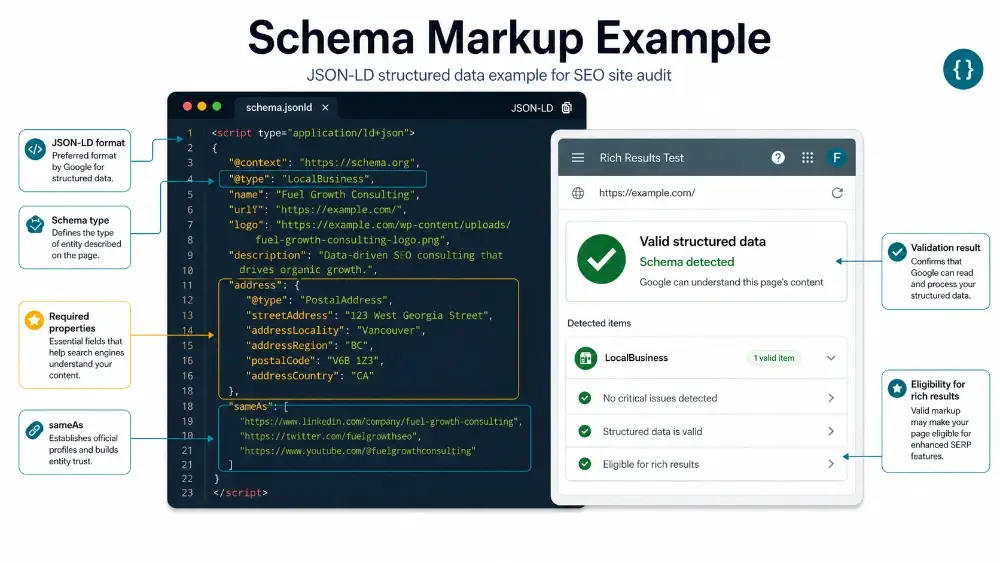
Schema helps search engines and AI systems understand what your page is about. In 2026, it’s also one of the strongest signals for AI search visibility.
- JSON-LD format: Use JSON-LD instead of Microdata or RDFa. It’s the format AI systems parse most reliably
- Core schema types: Implement Organization, Article, Product, FAQ, HowTo, and LocalBusiness where relevant
- Validation: Test markup using Google’s Rich Results Test
- Entity relationships: Use sameAs, author, and publisher properties to connect your content to known entities
- Breadcrumb schema: Add structured data to breadcrumb navigation
6. Security, status codes, and HTTPS hygiene
Security signals affect both rankings and trust.
- HTTPS: Confirm the entire site loads over HTTPS with a valid SSL certificate
- Mixed content: Check for HTTP resources (images, scripts) loading on HTTPS pages
- HTTP status codes: Important pages should return 200, removed pages should 301 to relevant replacements, and nothing critical should return a 404 or 5xx
- Redirect mapping: Avoid blanket redirects to the homepage. They waste link equity from old URLs
7. AI search readiness
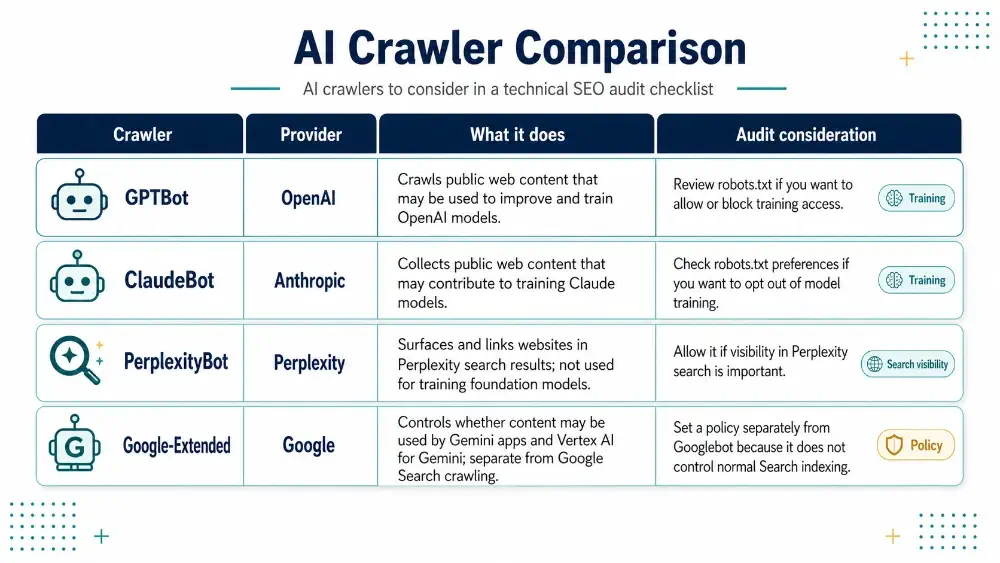
This is the layer most older audit checklists ignore, and it’s increasingly the difference between visibility and invisibility.
- AI crawler access: Decide which AI crawlers (GPTBot, ClaudeBot, PerplexityBot, Google-Extended) you want to allow in robots.txt
- Server-side rendering: Pages that depend on client-side JavaScript may not render properly for AI systems. Use SSR or static generation for important content
- Extractable content structure: Use clear topic sentences, structured lists, and direct answers. AI systems extract content that’s organized and unambiguous
- Entity clarity: Strengthen your brand entity through consistent NAP, About pages, and structured data
- llms.txt (optional): A newer convention some sites are adopting to guide LLMs toward priority content
Common mistakes to avoid during a technical SEO audit
A few patterns show up over and over in audits that miss the mark:
- Auditing 200 items instead of prioritizing the 20 that move rankings. Most issues have minimal impact. Focus on what affects revenue-bearing pages first.
- Treating the audit as a one-time event. Technical health drifts. Re-audit quarterly at minimum.
- Fixing symptoms instead of root causes. A broken canonical on one page is rarely just one page. It usually points to a template or CMS issue.
- Ignoring log files. Search Console samples data. Server logs show you what Googlebot actually crawls.
- Skipping AI search readiness. Sites optimized only for traditional Googlebot are already losing visibility in AI Overviews and ChatGPT search.
Tools you can use to run a technical SEO audit
You don’t need a stack of fifty tools. The essentials:
- Google Search Console: Free, indispensable for indexation, Core Web Vitals, and coverage data
- Google PageSpeed Insights: Real-user and lab data for Core Web Vitals
- Screaming Frog SEO Spider: The standard desktop crawler for full-site technical audits
- Sitebulb or Semrush Site Audit: All-in-one platforms with prioritized issue dashboards
- Google Rich Results Test: Validates structured data
- Server log analyzer: For larger sites, log analysis reveals what Googlebot actually crawls
For most SMB sites, Search Console plus Screaming Frog covers 80% of what you need.
When to hire a professional vs. DIY
A basic audit is doable in-house if you’re comfortable interpreting Search Console data and running a Screaming Frog crawl. Where it gets harder is implementation. Fixing JavaScript rendering issues, restructuring internal linking at scale, configuring schema across templates, and prioritizing what to fix first all take experience.
If your site has been losing rankings, recently migrated, or has never had a proper audit, working with someone who runs them weekly is usually faster and cheaper than figuring it out yourself. A professional technical SEO audit typically pays for itself by surfacing the two or three issues that have been silently capping your traffic.
For pages already in good technical shape, the next layer is usually content and on-page work. If that’s where you’re at, the on-page SEO checklist for small businesses is a solid next step.
Frequently asked questions
How long does a technical SEO audit take?
A basic technical SEO audit takes 3 to 5 hours for a small site and 1 to 2 weeks for a larger or more complex site. The time depends on the number of pages, the depth of the audit, and whether log file analysis is included. Implementation of the fixes typically takes longer than the audit itself.
How often should I run a technical SEO audit?
Run a full technical SEO audit at least quarterly. E-commerce sites, news sites, and sites that publish content frequently should audit monthly. Always run an audit immediately after a redesign, platform migration, or major Google algorithm update.
Can I do a technical SEO audit myself?
Yes, basic technical SEO audits are doable in-house using free tools like Google Search Console, PageSpeed Insights, and Screaming Frog. The harder part is interpreting the results and prioritizing fixes. Issues like JavaScript rendering, schema implementation, and crawl budget optimization usually need experienced help.
What’s the difference between a technical SEO audit and an on-page SEO audit?
A technical SEO audit reviews the infrastructure of your site (crawlability, indexation, speed, schema, security). An on-page SEO audit reviews the content elements on each page (title tags, headings, keyword usage, internal linking, content quality). Both are needed for strong rankings.
How much does a technical SEO audit cost?
Technical SEO audits typically range from $500 to $5,000+ depending on site size, complexity, and depth. One-time audits sit on the lower end. Audits that include log file analysis, JavaScript rendering reviews, and a prioritized fix roadmap sit on the higher end. At Fuel Growth Consulting the technical audit is part of the $497 SEO Audit, delivered in 7 business days with a 45-minute walkthrough call.
Will a technical SEO audit guarantee higher rankings?
No audit guarantees rankings. A technical SEO audit removes the technical barriers that prevent your content from ranking, but rankings also depend on content quality, search intent alignment, backlinks, and competition. Think of the audit as the foundation, not the finish line.
Final takeaway
A technical SEO audit isn’t about perfection. It’s about removing the friction that prevents search engines and AI systems from giving your content the visibility it deserves. Focus on the categories that affect rankings most: crawlability, speed, structure, schema, and AI readiness. You’ll catch the issues that actually matter before they cost you traffic.
The sites that win in 2026 aren’t the ones with the cleanest audit reports. They’re the ones that run audits regularly, fix the right things first, and treat technical health as ongoing maintenance rather than a one-time project.
Want a clear picture of what’s holding your site back? Book a free 30-minute strategy call and we’ll walk you through the issues that matter most for your business.
