
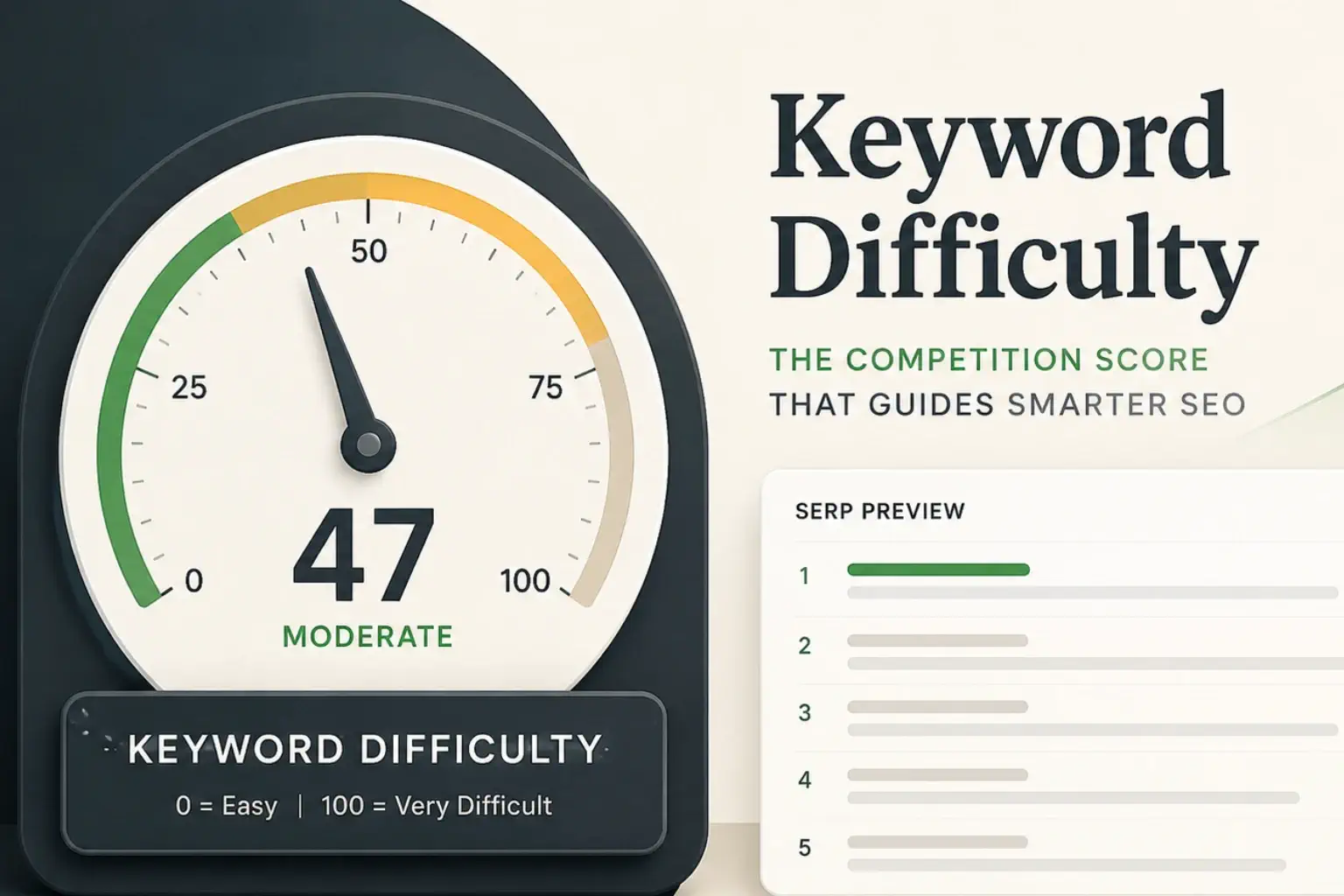
Most SEO advice treats keyword difficulty like a verdict. The number is high, skip it. The number is low, write the post. Done.
That framing is comfortable, and it’s wrong often enough to waste real money. Keyword difficulty is a useful starting filter, not a ruling. For a small business with a tight content budget, treating it as gospel is one of the fastest ways to either chase keywords you’ll never rank for or skip ones you’d have won quietly.
This guide breaks down what keyword difficulty actually measures, how the major tools calculate it, what a “good” score looks like in practice, and where the metric quietly misleads you. By the end you should be able to read a KD score, weigh it against the rest of the SERP, and decide whether a keyword is worth your time.
What is keyword difficulty?
Keyword difficulty is an SEO metric that estimates how hard it would be to rank on the first page of Google for a given keyword. Most tools score it from 0 to 100, with 0 being the easiest and 100 being the hardest. The score is a prediction, not a fact, because Google has never published its full ranking system. Each tool builds its own formula from public signals like backlinks, domain authority, search intent, and which features appear in the SERP.
In practical terms, KD answers a single question. If you publish a well-optimized page on this topic, what are the odds it can crack the first page of Google? A score of 12 means “almost any decent page should rank with effort.” A score of 82 means “you’re competing with established, well-linked sites and you’ll need significant authority and content depth to beat them.”
A few quick notes that matter:
- KD is not the same as paid keyword competition. Google Ads’ “competition” metric refers to how many advertisers are bidding on the term, not how hard it is to rank organically.
- KD is a relative signal. A KD of 60 is brutal for a brand new site and routine for one with strong topical authority and a healthy backlink profile.
- KD scores from different tools do not match. A keyword scored 35 in Ahrefs might show 52 in Semrush. They use different inputs.
That last point is where people get tripped up first.
How keyword difficulty is calculated
Different tools use different inputs, but the logic is similar. They look at the pages currently ranking on page one, measure how strong those pages are, and translate that strength into a score.
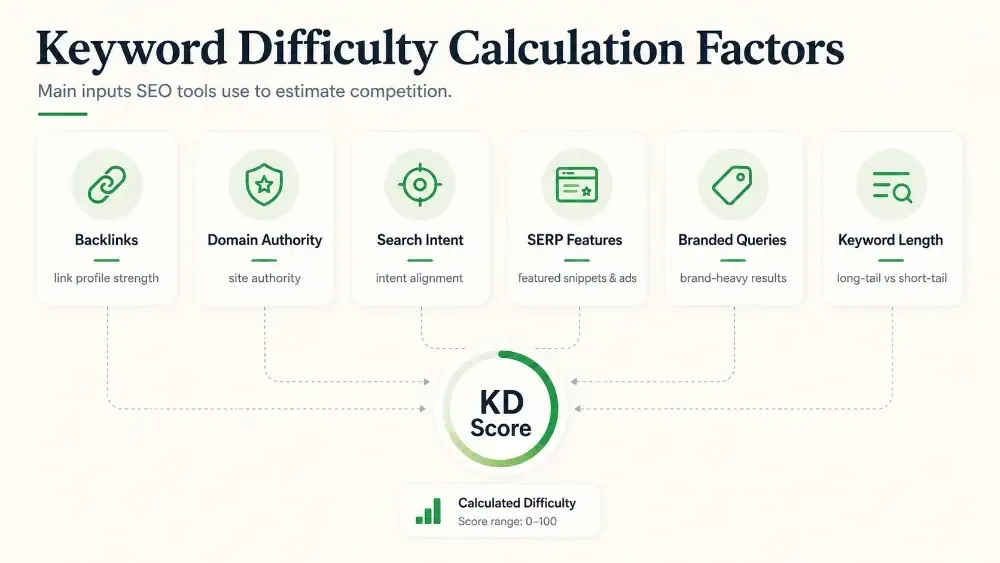
Backlinks to the top-ranking page: This is the dominant factor in most formulas. Ahrefs, for example, calculates KD almost entirely by counting the number of unique websites linking to the top 10 results. The more sites linking to those pages, the harder it is to outrank them.
Domain authority of the ranking sites: Semrush layers in the median authority score of the domains on page one. If five of the top 10 results come from sites with very high authority scores, the KD will be higher than if those same positions were held by mid-authority blogs.
Search intent and content type: A query like “buy running shoes” surfaces e-commerce stores. A “how to choose running shoes” guide will not rank there, no matter how well written, because Google has read the intent as transactional. Tools factor in how cleanly the page type matches the intent.
SERP features: AI Overviews, featured snippets, knowledge panels, local packs, and shopping results all eat clicks before the organic listings. When these features show up, the difficulty score tends to climb because there’s less organic real estate to win.
Whether the keyword is branded: Branded queries like “Nike running shoes” are dominated by the brand’s own properties, which makes ranking for non-brand sites harder by default.
Keyword length: Long-tail variants (“best trail running shoes for flat feet under $150”) are usually less competitive than head terms (“running shoes”). The specificity narrows the field.
If you ever wonder why your favorite tool flags a keyword as easy and another flags it as moderate, this is why. The inputs are different, and the weighting is different. None of them are “right.” They’re estimates from different angles.
What’s a good keyword difficulty score?
There is no universal answer, and anyone who gives you one is selling something. The honest answer depends on your site’s authority. A score of 50 is hard for a brand new local plumbing site. The same score is a layup for a 10-year-old e-commerce brand with 5,000 referring domains.
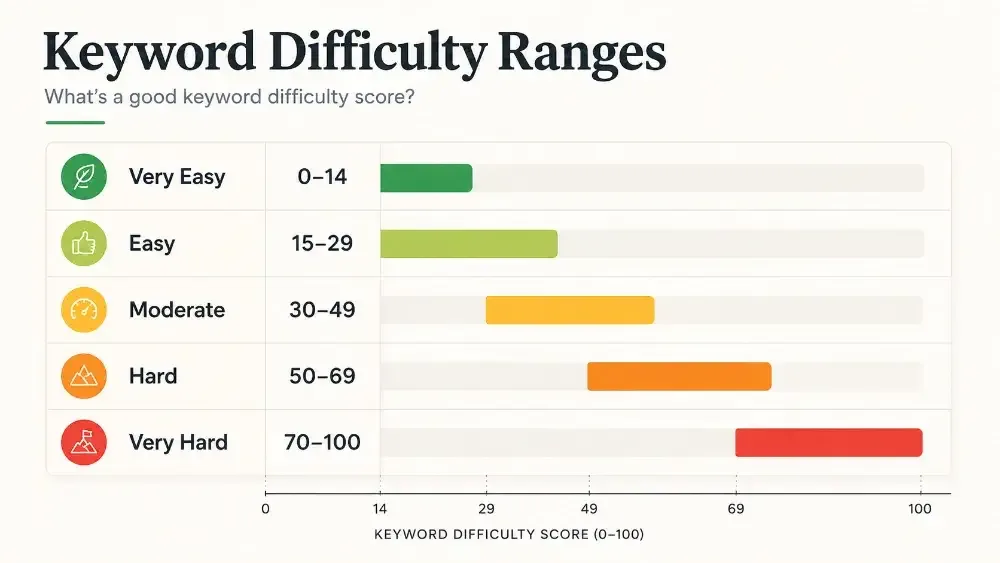
That said, most tools group scores into rough bands that work as a starting point:
- 0 to 14: Very easy. Realistic targets for new or low-authority sites.
- 15 to 29: Easy. Achievable with a solid, intent-matched page.
- 30 to 49: Moderate. Possible with quality content and some existing authority.
- 50 to 69: Hard. Needs strong topical authority, links, and depth.
- 70 to 100: Very hard. Realistic mostly for established sites with significant link equity.
A useful framing: pick a target keyword, then look at the domain authority of the sites currently ranking. If your site’s authority is in their neighborhood or higher, the published KD probably overstates the challenge for you. If you’re well below them, it understates it.
The score on the screen is the average difficulty across the open web. Your difficulty is your difficulty.
Why keyword difficulty is misleading on its own
This is the section most explainers skip, and it’s the one that costs SMBs real money when ignored.
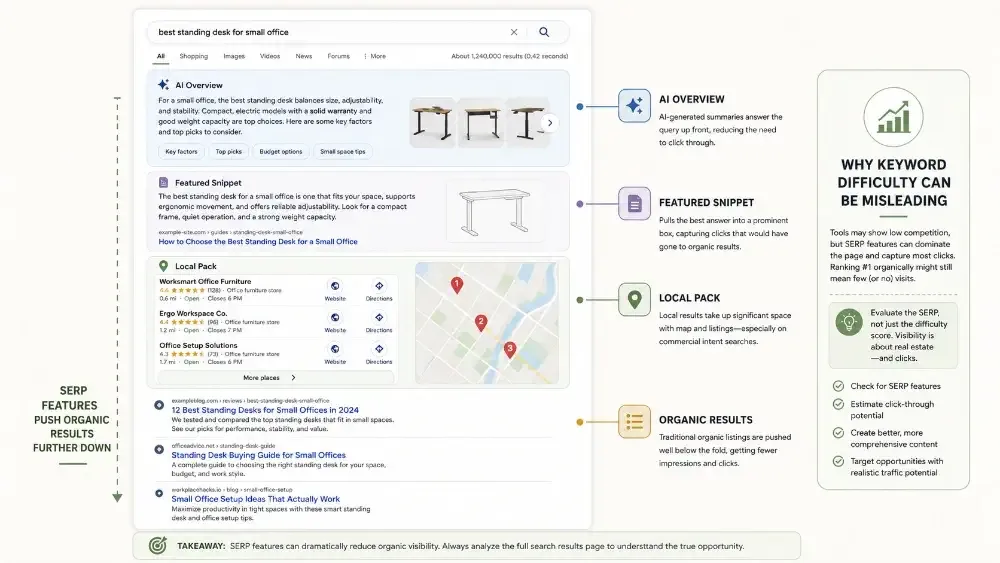
Search intent overrides difficulty: A keyword with a low KD is not actually low-difficulty if your page format doesn’t match what Google is rewarding. If the top 10 results are all product category pages and you publish a 2,000-word guide, you will not rank, regardless of how easy the score said it would be. Always read the SERP before trusting the number.
SERP features eat your clicks: A keyword can have a low KD and still send almost no traffic if AI Overviews, a featured snippet, a video carousel, and a local pack push the organic results below the fold. The score measures how hard it is to rank. It does not measure how much traffic ranking will earn you.
AI search is changing the calculation: AI Overviews and answer engines like ChatGPT, Perplexity, and Google’s AI Mode are intercepting clicks for definitional and informational queries before users ever scroll. KD scores are slow to reflect this shift. A keyword that scored well a year ago may now deliver a fraction of the traffic because the SERP has been quietly restructured.
KD doesn’t measure your specific opportunity: Some tools now offer a “personal” or site-specific version of KD that adjusts for your domain’s authority and topical strength. These are more useful than the raw score, but they’re still estimates. The most reliable approach is to manually audit the first page for any keyword you’re seriously considering.
The point isn’t that the metric is broken. The point is that it’s one input. Treating it as the only input is how content calendars get filled with low-KD keywords that never bring in real visitors.
How to actually use keyword difficulty in keyword research
Here’s a practical workflow that respects KD without being captured by it.
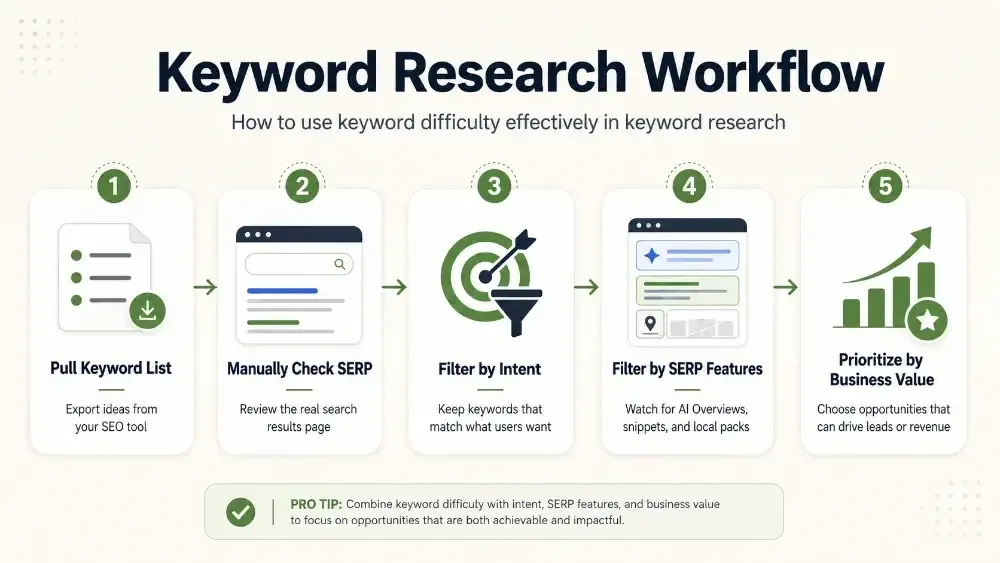
1. Pull a target list filtered by KD and search volume: Start broad. Pull keywords in your topic area with KD under whatever ceiling matches your site’s authority. For a newer SMB site, that’s usually under 30. For a more established site, 30 to 50.
2. Manually check the top 10 for each shortlisted keyword: Look at three things. The type of pages ranking (blog post, category page, product page, comparison, video). The age and authority of the domains. Whether AI Overviews or other SERP features dominate the page.
3. Throw out keywords where intent doesn’t match what you can build: If the SERP wants product pages and you’re a service business, move on. The KD score is irrelevant if the format mismatch is fatal.
4. Throw out keywords where SERP features will starve you of clicks: If an AI Overview answers the question completely and the top organic result has a tiny click-through rate, the keyword is technically rankable but commercially unattractive.
5. Prioritize what’s left by business value, not just KD: A KD 45 keyword that brings in qualified buyers is worth more than three KD 10 keywords that bring in students writing essays. Match your priority list to revenue, not difficulty.
This approach takes longer than sorting a spreadsheet by KD ascending. It also produces dramatically better content plans.
Common keyword difficulty mistakes SMBs make
A few patterns show up over and over with small business clients:
Chasing low-KD keywords with no commercial intent: Easy to rank, easy to publish, easy to ignore. These pages collect dust and produce nothing.
Skipping medium-KD keywords that are in reach: A KD of 35 for a service business in a specific Canadian city is often very winnable, even for newer sites. Reading “moderate” and skipping it is a common, expensive miss.
Comparing KD scores across tools: A keyword scored 28 in one tool and 51 in another isn’t a contradiction. Pick a tool, learn its scale, and stick with it for benchmarking inside your own site.
Ignoring AI search visibility entirely: KD scores were designed for the classical 10-blue-links SERP. They were not designed for a world where AI Overviews and answer engines pull from your content without sending a click. SMBs that don’t audit how they appear in AI search are working with an incomplete picture of what their visibility actually looks like.
Believing KD predicts timeline, It doesn’t. Even a low-KD keyword can take months for a new site to rank for, because new sites need time and signals before Google trusts them. If you want a clearer picture of timelines, our guide on how long SEO takes walks through the realistic month-by-month curve.
The bottom line
Keyword difficulty is a useful filter, not a verdict. It tells you roughly how competitive a keyword is across the open web. It does not tell you whether your site can rank, whether the intent fits, whether SERP features will gut your traffic, or whether the keyword will earn you any business.
Use it the way a good editor uses a word count. As a check, not a strategy.
If you’re trying to make smarter keyword decisions, the next step is usually to audit how visible your site already is, both in classical search and in the AI search layer that KD scores quietly miss. Our SEO Audit tests 25 priority searches in Google AI Overviews, ChatGPT, Gemini and Perplexity, and shows which competitors get mentioned instead of you. It’s a $497 one-time audit with a written report and a 45-minute walkthrough call. If your keyword research has been guided entirely by KD up to now, it’s a useful second lens.
